Fonts3.5.0
Publisher Description
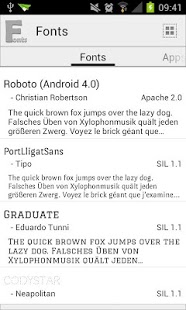
This application offers fonts for many other applications.
For directions see advanced in-app help (Select app).
Supported apps:
- GO Launcher EX
- GO SMS Pro
- GO Keyboard
- Handcent SMS
- ChompSMS
- Pansi SMS
- PicsArt
- Simple Text
- Banner
- Photo Editor
- PC or Mac
46 different fonts, including Android 4 font Roboto.
Fonts:
Roboto (Android 4.0), PortLligatSans, Graduate, Codystar, AnnieUseYourTelescope, Condiment, Share, Iceberg, Shojumaru, MacondoSwashCaps, Acme, SquadaOne, PatuaOne, MountainsofChristmas, Iceland, Aladin, BubblegumSans, Baumans, Fascinate, SpicyRice, CreepsterCaps, OSP-DIN, CursiveSerif, Alfphabet, Segment14, Dotrice-Bold, MedievalSharp, LiberationSerif-Bold, YanoneKaffeesatz, GoudyBookletter1911, MaidenOrange, Lobster, WalterTurncoat, VT323, CarterOne, Geo, Sancreek, Salsa, Rancho, Schoolbell, JustAnotherHand, Tangerine
Supports App2SD.
Permissions:
Required for "PicsArt", "Photo Editor" and "Simple Text". If you do not use one of them no data will be stored to your sdcard.
You are missing a font?
You found another App that is able to use external fonts?
Write a mail, i will add them to the lists. ;)
About Fonts
The company that develops Fonts is beewhale. The latest version released by its developer is 3.5.0. This app was rated by 82 users of our site and has an average rating of 3.0.
To install Fonts on your Android device, just click the green Continue To App button above to start the installation process. The app is listed on our website since 2012-11-22 and was downloaded 11,312 times. We have already checked if the download link is safe, however for your own protection we recommend that you scan the downloaded app with your antivirus. Your antivirus may detect the Fonts as malware as malware if the download link to com.beecub.tools.fonts is broken.
How to install Fonts on your Android device:
- Click on the Continue To App button on our website. This will redirect you to Google Play.
- Once the Fonts is shown in the Google Play listing of your Android device, you can start its download and installation. Tap on the Install button located below the search bar and to the right of the app icon.
- A pop-up window with the permissions required by Fonts will be shown. Click on Accept to continue the process.
- Fonts will be downloaded onto your device, displaying a progress. Once the download completes, the installation will start and you'll get a notification after the installation is finished.
Program Details
System requirements
Download information
Pricing
Version History
version 3.5.0
posted on 2012-11-22
Version 3.5:,- (New) Description how to get the fonts to your PC or Mac,- (New) Several ways to help,- (New) Fonts:,- FingerPaint,- ShareTech,- MontserratAlternates,Version 3.4:,- (New) Support for "Photo Editor",- (New) Donation support,Version 3.3:,- (New) Support for "Simple Text",- (New) Support for "Banner",New Permission: Write external storage, required for "PicsArt" and "Simple Text".,If you do not use "PicsArt" or "Simple Text" no data will be stored to your sdcard.
version 3.5.0
posted on 2012-11-22
Several fixes and updates
